
AV2ERP · Autodesk Vault add-in

Autodesk Vault to SAP S/4HANA Cloud Integration

From the Vault item master, AV2ERP brings SAP S/4HANA up to date: products, the material BOM header and every BOM item under an engineering change number. The ERP Data tab in Vault then shows where Vault and SAP still differ.

Vault and SAP S/4HANA

Products and material BOMs, kept in step with Vault

Every design in Autodesk Vault has to become products and a material BOM in SAP S/4HANA Cloud, and again at every change. Keyed in by hand, product data and BOM quantities drift apart from what engineering released.

AV2ERP sends items and bills of materials from Vault by right-click, button or workflow approval. A field mapping and an optional macro decide what each SAP field receives, and the ERP tabs in Vault read SAP back so designers can check a product without an SAP login.

  • Products and BOM items

    Material BOM header and items under a change number, from one right-click.

  • Unchanged is skipped

    Products that are already current report Update skipped instead of being rewritten.

  • Differences in red

    The ERP Data tab shows which cell no longer matches SAP.

  • Rules by request

    Describe a product type rule; review the preview before anything reaches SAP.

Video

Vault to SAP S/4HANA: send, check and set a product type rule

The assembly is sent all levels, its material BOM is opened in SAP, a too-long description is caught in Vault, and the assistant previews FERT, HALB and HAWA per item.

How it works

Products and material BOMs from the Vault item master

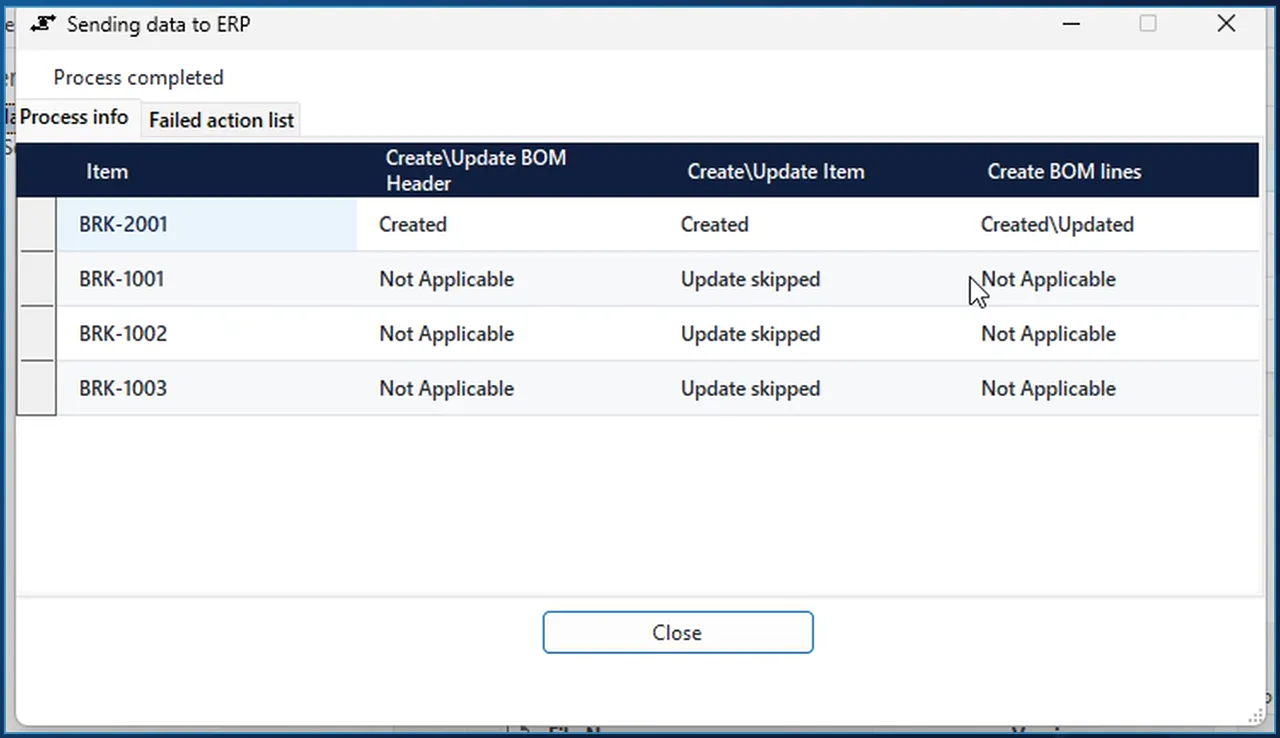
AV2ERP send dialog for SAP S/4HANA: BOM header and lines created for BRK-2001, components reported as Update skipped

Send

Send to SAP S/4HANA, all levels

Right-click the assembly in Vault and choose AV2ERP > Send to SAP S/4HANA all levels. AV2ERP reads the item and its bill of materials, applies your rules and brings SAP up to date: the products, the material BOM header and every BOM item.

  • One row per Vault item, with columns for the BOM header, the product and the BOM lines.
  • Products that already exist and have not changed are reported as Update skipped. In this run that was the three components; the assembly's BOM header was Created and its lines Created\Updated.
  • Failures go to the Failed action list tab in the same dialog.
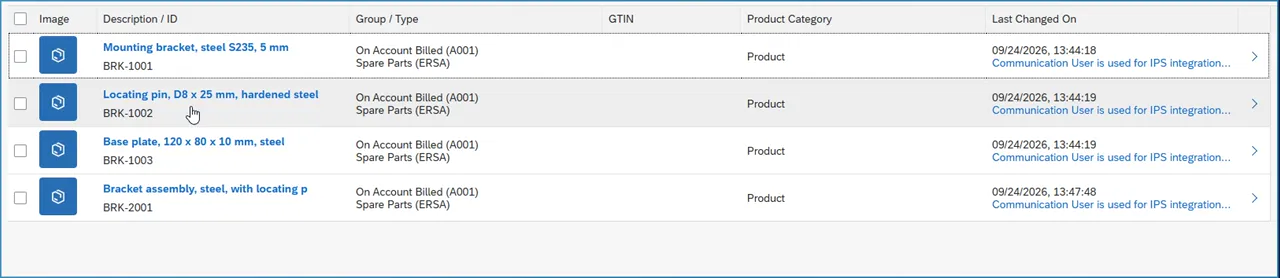
SAP S/4HANA product list with the four products sent from Vault, their descriptions, product group A001 and type ERSA

Result in SAP

Products with their Vault descriptions

The products appear in SAP with their descriptions from Vault, product group A001 and product type ERSA, the fixed value in this mapping. Fixed values such as the product type and the unit are set once and apply to every send.

  • Which Vault property fills which SAP field is part of the same mapping.
  • When a fixed value is not enough, a macro rule takes over; see the product type rule further down.
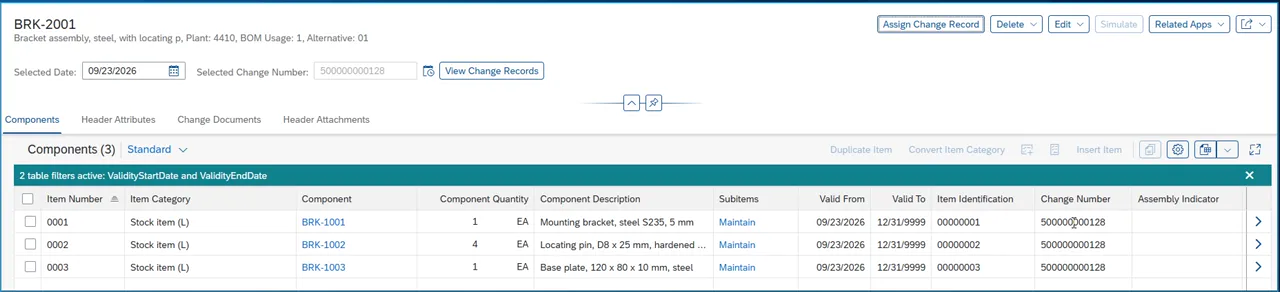
SAP S/4HANA material BOM BRK-2001, plant 4410, with three stock items, their quantities and change number

Result in SAP

The material BOM under a change number

BRK-2001 gets a material BOM for plant 4410, BOM usage 1, alternative 01. Its three BOM items are stock items with quantities 1, 4 and 1 EA, the same structure as the Vault bill of materials, and all of them carry the engineering change number the send used.

  • BOM items are numbered 0001, 0002 and 0003, each with a valid-from date and the change number.
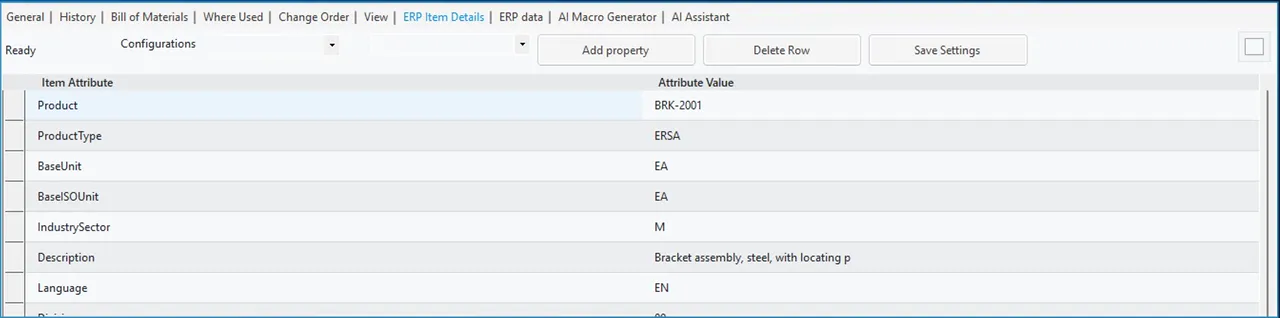
ERP Item Details tab in Autodesk Vault showing SAP S/4HANA product BRK-2001 with product type, base unit and description

Check in Vault

The SAP product on the Vault item

The ERP Item Details tab reads the product from SAP S/4HANA Cloud while you look at the Vault item: product type, base unit, description. If the product does not exist in SAP yet, the tab shows that too.

  • Pick the SAP properties the tab displays.
  • The layout is stored, so nobody adjusts it item by item.
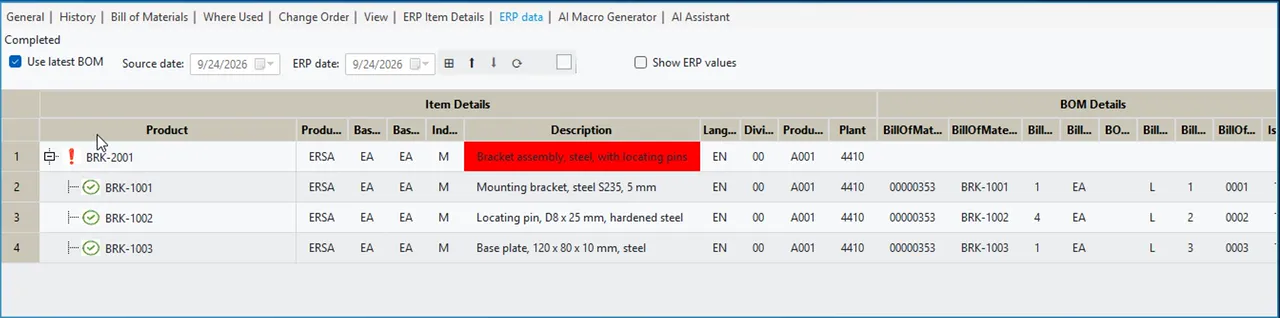
ERP Data tab in Autodesk Vault comparing Vault and SAP S/4HANA line by line, with the too-long assembly description marked red

Compare

Vault against SAP, line by line

The ERP Data tab puts Vault and SAP side by side with a green check on every line that agrees. SAP keeps 40 characters of a product description; the assembly's Vault description is longer, so exactly that cell is red.

  • Item properties of first-level children are compared, so design changes since the last transfer are visible.
  • With BOM versioning in SAP, the current Vault BOM can be compared with an earlier ERP version.
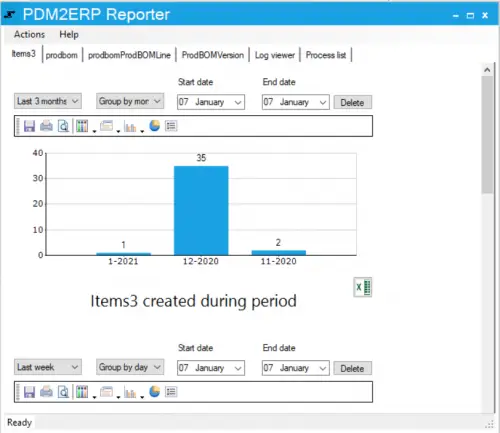
PDM2ERP Reporter with a bar chart of items created per month and tabs for production BOMs, BOM lines, BOM versions, the log viewer and the process list

Traceability

Transfers, logs and Excel reports

The PDM2ERP reporting tool tracks what AV2ERP sent from Vault to SAP and when. Pick a period to see how many items were created or updated and by whom.

  • Export the figures to Excel.
  • Open the log viewer or the process list to follow up a failed transfer.
AI Macro Generator in Vault showing the preview result of a product type rule: FERT, HALB and HAWA per item, nothing sent

Rules and AI

Product type by rule

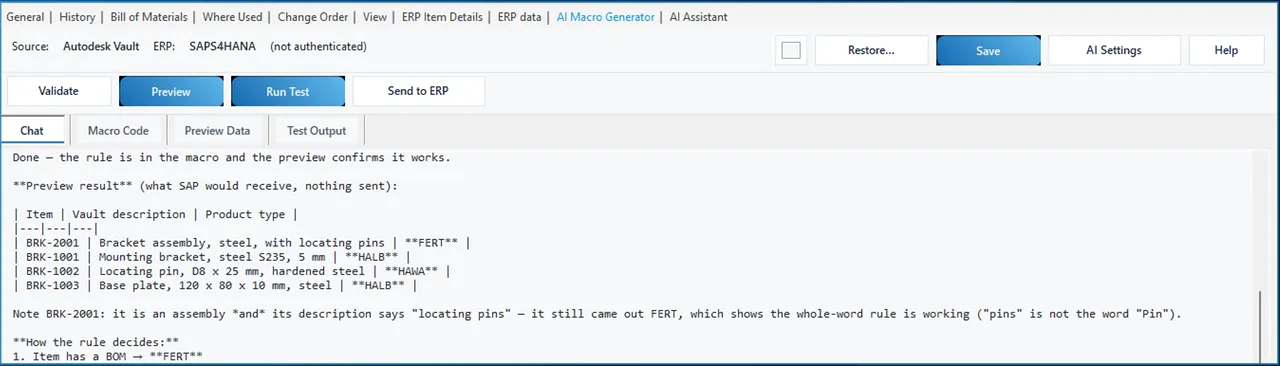
The request in the demo: parts with screw, ring or pin in the description are bought in, so they become trading goods; the assembly is a finished product; everything else is semi-finished. The assistant confirmed the ProductType field in SAP and how the macro builds the product payload, added the rule, compiled it and ran a preview.

  • Preview result: the locating pin HAWA, the assembly FERT, bracket and base plate HALB.
  • It matches whole words. The assembly's description says "locating pins", and it still comes out FERT, because assemblies are decided first and "pins" is not the word "pin".
  • Changes to the field mapping wait for your approval, and the preview writes nothing to SAP.
AI chat in Vault listing Vault items with Bracket in the title, whether they exist in SAP S/4HANA and their current product type

Questions and search

Asking SAP from Vault

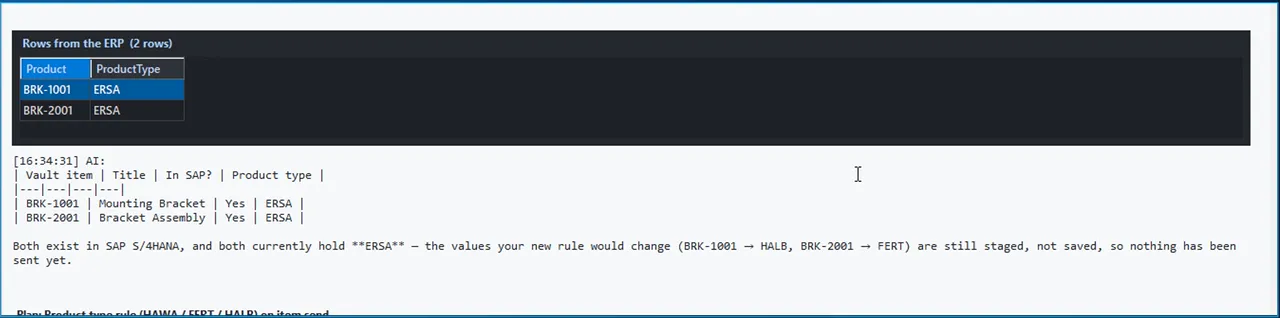
Asked whether the component quantities match SAP, the assistant compared the Vault BOM with the BOM items in SAP and answered that all three match, including the four locating pins. Asked to find the Vault items with Bracket in the title and give their product type in SAP, it searched Vault, queried SAP and answered in one table.

  • Both products exist and both still hold ERSA. The assistant points out that the new FERT and HALB values are staged, not saved, so nothing has been sent yet.
  • The rows read from SAP are shown above the answer.

The assistant works with your own key for Claude, OpenAI, Azure OpenAI or a compatible model, with a ChatGPT sign-in, with a coding agent such as Claude or Gemini, or with your own assistant through the MCP connector.

Related integrations

SAP S/4HANA from other hosts, Vault with other ERPs

The same AV2ERP install can target Business Central, Dynamics 365 Finance and Operations, SAP S/4HANA or SAP Business One; you choose the ERP when you install it.

FAQ

Questions about Vault and SAP S/4HANA

What does AV2ERP create in SAP S/4HANA from a Vault assembly?

Send to SAP S/4HANA all levels creates or updates a product for every item in the Vault bill of materials, and for the assembly the material BOM header and each BOM item. Products that already exist and have not changed are reported as Update skipped.

Are the BOM items created under a change number?

Yes. In the demo the material BOM for plant 4410, BOM usage 1, alternative 01 got three stock items numbered 0001 to 0003, each with a valid-from date and the engineering change number the send used.

What happens when a Vault value does not fit SAP, such as a long description?

SAP keeps 40 characters of a product description. The ERP Data tab in Vault compares Vault and SAP line by line and marks that description cell red, so the difference is visible before anyone relies on the SAP text.

How is the product type decided?

A fixed product type can be set once in the field mapping. When it depends on the part, a macro decides, for example FERT for assemblies, HAWA for bought-in screws, rings and pins, HALB for the rest. The AI Macro Generator writes and compiles that macro and previews the result without writing to SAP.

Which AI models can the assistant use?

Your own key for Claude, OpenAI, Azure OpenAI or a compatible model, a ChatGPT sign-in, a coding agent such as Claude or Gemini, or your own assistant through the MCP connector. It can read Vault and SAP, but mappings, macros and SAP data change only after you approve.

Does the same product work with other ERPs or with Inventor?

One AV2ERP install targets Business Central, Dynamics 365 Finance and Operations, SAP S/4HANA or SAP Business One, chosen during installation. The SAP connection is also available inside Autodesk Inventor.

Bring a Vault assembly and your SAP product fields

In a demo we send it to SAP S/4HANA as products and a material BOM, check it from Vault and show how your product type or plant rules would be written. Questions first? Use the contact page.

Cookies Notice

We use cookies to improve your browsing experience and to understand how our website is used. Cookies help us deliver better performance, personalize content, and analyze traffic. By continuing to use PLM CAD Utilities, you agree to our use of cookies.