- Home
- /
- Applications
- /
- Autodesk Revit
- /
- Autodesk Revit Dynamics Business Central Integration – REV2ERP
Autodesk Revit Dynamics Business Central Integration – REV2ERP
Seamless Data Exchange Between Autodesk Revit and Dynamics Business Central
Unlock the power of automation and streamline your engineering and business workflows with our Autodesk Revit Dynamics Business Central integration solution—REV2ERP. Designed for easy setup and advanced functionality, REV2ERP enables smooth, real-time data exchange between Autodesk Revit and Microsoft Dynamics Business Central (formerly Dynamics Navision).
This integration supports complex scenarios such as BOM comparisons, data modifications via custom scripts, and two-way synchronization—helping teams maintain accuracy and efficiency throughout the product lifecycle and business processes.
Watch the Demo
Discover how REV2ERP seamlessly connects Autodesk Revit with Dynamics Business Central to streamline your data management.
▶️ Watch on YouTube
Why Choose REV2ERP for Autodesk Revit and Business Central Integration?
- Effortless Data Transfer
- Advanced BOM Comparison
- Customizable Data Modification
- ERP Data Visibility Within Revit
- Two-Way Integration
- Direct Autodesk Inventor Integration
- Attachment Management
- Vendor and Customer Updates
- Comprehensive Tracking & Reporting
- Customizable Preview Settings
- Error Logging & Process History

Key Integration Features
- Automate data transfers during workflow events to eliminate manual entry errors.
- Manage, compare, and update production and assembly BOMs between Revit and Business Central.
- Preview real-time ERP item data directly from Autodesk Revit for faster decisions.
- Monitor user activity and analyze data transfer volumes over chosen time periods.
- Generate detailed reports exportable to Excel for audits and continuous improvement.
- Schedule a demo to see how REV2ERP can streamline your integration needs.

Key Features of REV2ERP Integration
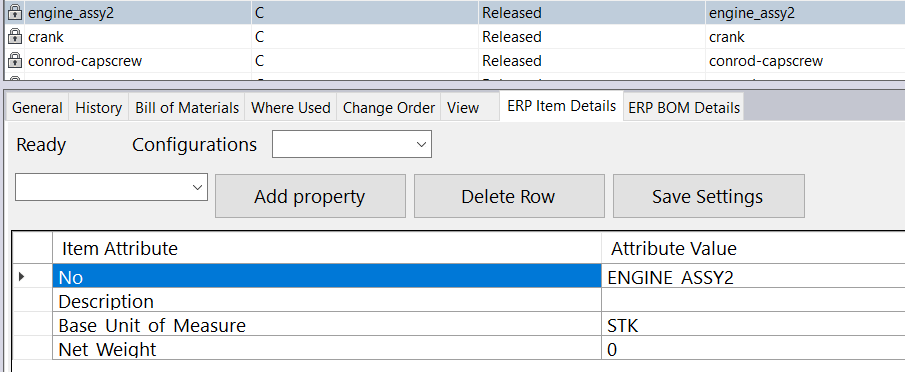
Preview Dynamics Business Central Item Properties Inside Autodesk Revit
- View real-time ERP data for Dynamics Business Central and Dynamics Navision items directly in Revit
- Quickly identify if an item exists in Dynamics Business Central or Navision from within Revit
- Customize which item properties are shown in the Revit preview to fit your needs
- Save preview settings for consistent and quick access without repeated adjustments
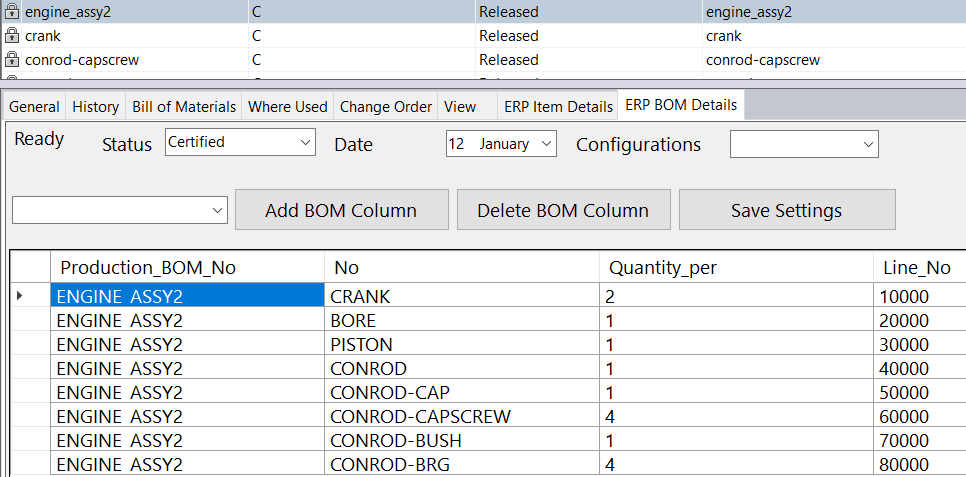
Preview Dynamics Navision (Dynamics Business Central) BOM Inside Autodesk Revit
- Preview current and older Bill of Materials when BOM versioning is enabled in Dynamics Navision or Business Central
- Customize which ERP BOM columns to display in the Revit preview for tailored views
- Save column settings to use the same layout in future previews for convenience
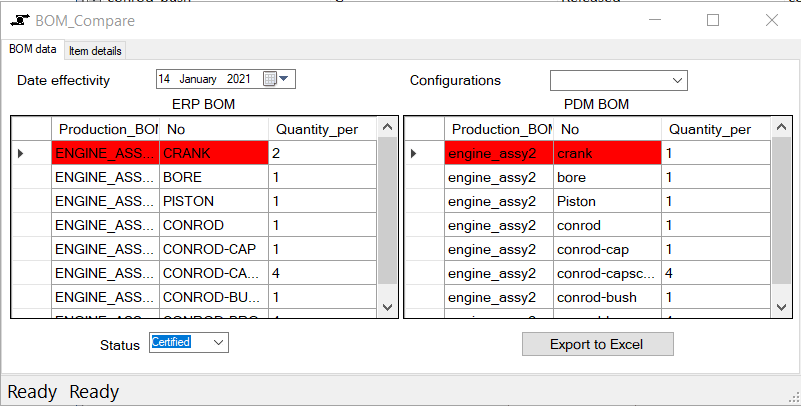
Compare Dynamics NAV BOM with Autodesk Revit BOM
- Compare current Autodesk Revit BOM with Dynamics NAV or Business Central BOM for accuracy
- Review differences with previous ERP BOM versions when BOM versioning is enabled
- Identify changes in item properties of first-level components easily
- Track updates made in Revit since the last data transfer to ERP for better control
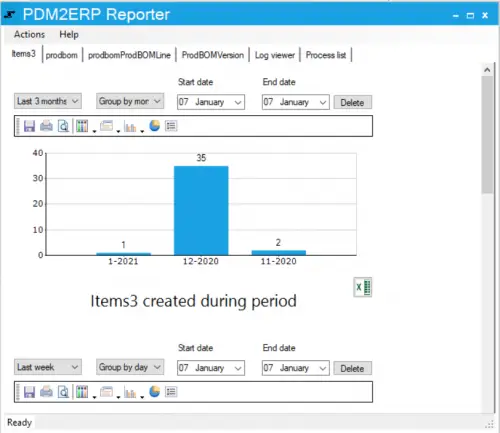
Track and Monitor Data Transfers with PDM2ERP
- Keep track of all data transferred from PDM to ERP efficiently
- View how many items have been created or updated within a specific time frame
- Identify which users have created or updated items during that period
- Export detailed reports to Excel for comprehensive analysis
- Access historical logs for error investigation using the log viewer
- Review detailed information on past processes through the process list
Contact Us
Ready to simplify your Autodesk Revit and Dynamics Business Central integration?
Contact us today to learn more or schedule a demo and experience REV2ERP’s powerful capabilities firsthand.