ERP Integrator for desktop applications · SOLIDWORKS PDM add-in

SOLIDWORKS PDM to SAP Business One Integration

Right-click a released assembly in the vault and ERP Integrator creates it in SAP Business One: the items, the bills of materials for the assembly and its sub-assemblies, and every line, from the data cards and with your company's rules applied. The ERP Data tab then shows where the vault and SAP Business One differ.

SOLIDWORKS PDM and SAP Business One

What engineering released is what SAP Business One holds

Engineers design in SOLIDWORKS and release in PDM, and every design in the vault has to become items and a bill of materials in SAP Business One. Typed in by hand, that is slow and easy to get wrong.

ERP Integrator for desktop applications connects the two inside the vault. It reads the data cards and the bill of materials from PDM, a field mapping decides which variable fills which SAP Business One field, and an optional macro holds the rules that go further.

  • All levels by right-click

    Items, bills of materials and lines for the assembly and its sub-assemblies.

  • Differences in red

    The ERP Data tab compares the data cards with SAP Business One.

  • BOM as of a date

    Compare the vault's structure on a date with SAP Business One.

  • Where-used, answered

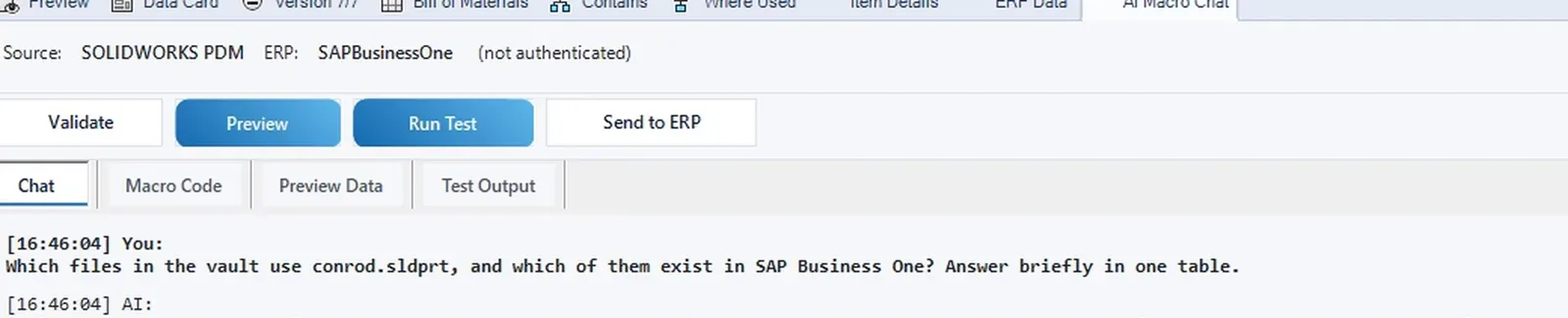
    Ask the AI which files use a part and whether they exist in the ERP.

Video

SOLIDWORKS PDM to SAP Business One: send, check, compare and add a rule

The engine assembly is sent all levels from the vault, its bill of materials is opened in SAP Business One, a changed description is caught on the ERP Data tab, an earlier state is compared as of a date and the assistant previews Buy and Make.

How it works

From the vault to SAP Business One

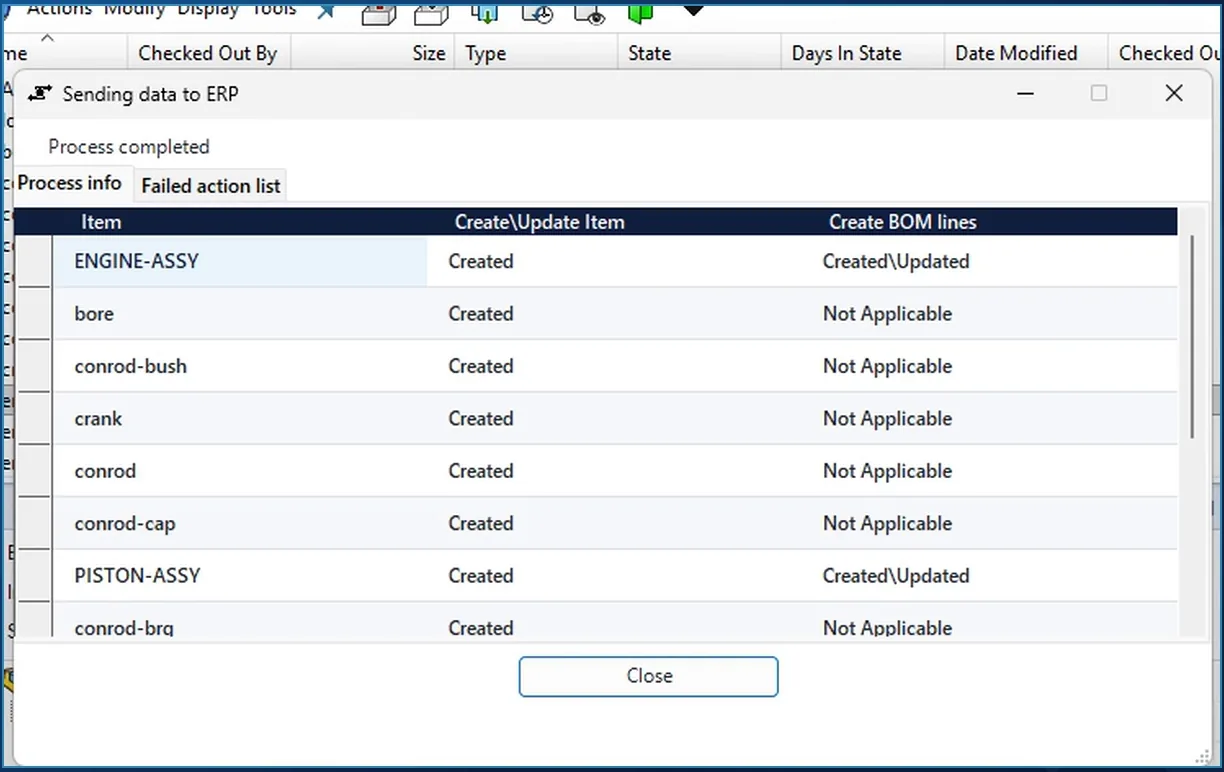
ERP Integrator send dialog over the SOLIDWORKS PDM vault: ENGINE-ASSY and its components Created in SAP Business One, BOM lines Created\Updated

Send

Send to SAP Business One, all levels

Select the assembly in the vault, right-click and choose ERP Integrator > Send to SAP Business One all levels. It reads the data cards and the complete bill of materials from PDM, applies your rules and creates everything in SAP Business One: the items, the bills of materials for the assembly and its sub-assembly, and every line.

  • In the demo the file names serve as item numbers; any data card variable can be the key.
  • One row per file, with what happened to the item and to its bill of materials lines.
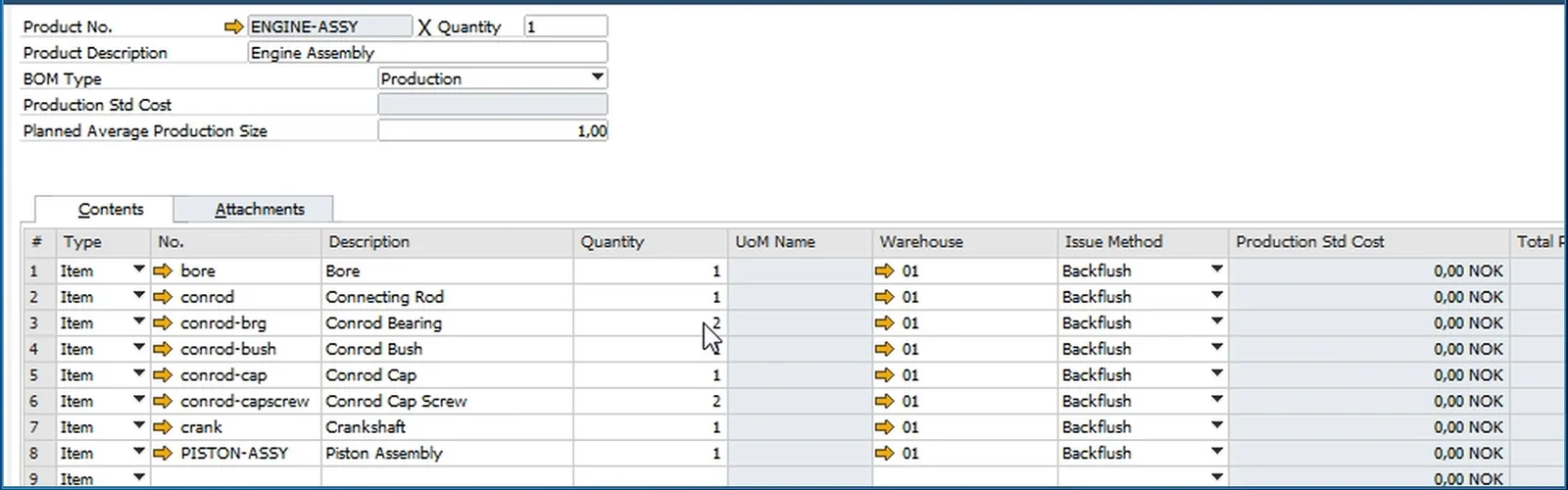
SAP Business One bill of materials for ENGINE-ASSY with eight lines, the file names as item numbers and their quantities

Result in SAP Business One

The bill of materials, line by line

In SAP Business One the bill of materials of the engine assembly lists all eight lines, with the file names as item numbers, the data card descriptions and the quantities: the same structure as in the vault.

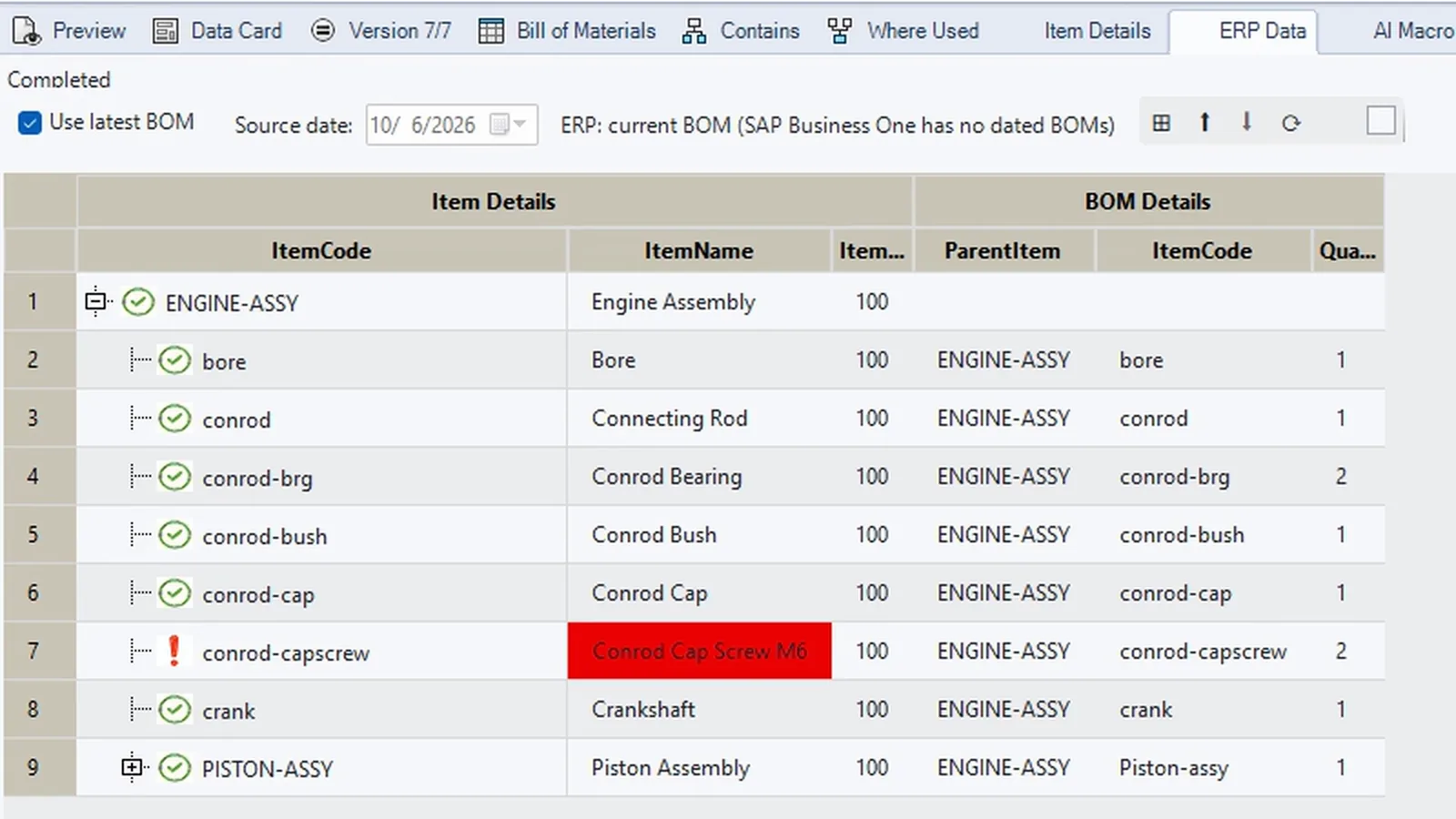
ERP Data tab in SOLIDWORKS PDM comparing the vault and SAP Business One, the changed description of the cap screw marked red

Check in the vault

Live SAP Business One data inside PDM

Nobody has to leave the vault to check. The Item Details tab shows the item live from SAP Business One, and the ERP Data tab puts PDM and SAP Business One side by side.

In the demo the cap screw's description has since changed on its data card, so the difference stands out in red, and the tooltip shows both values.

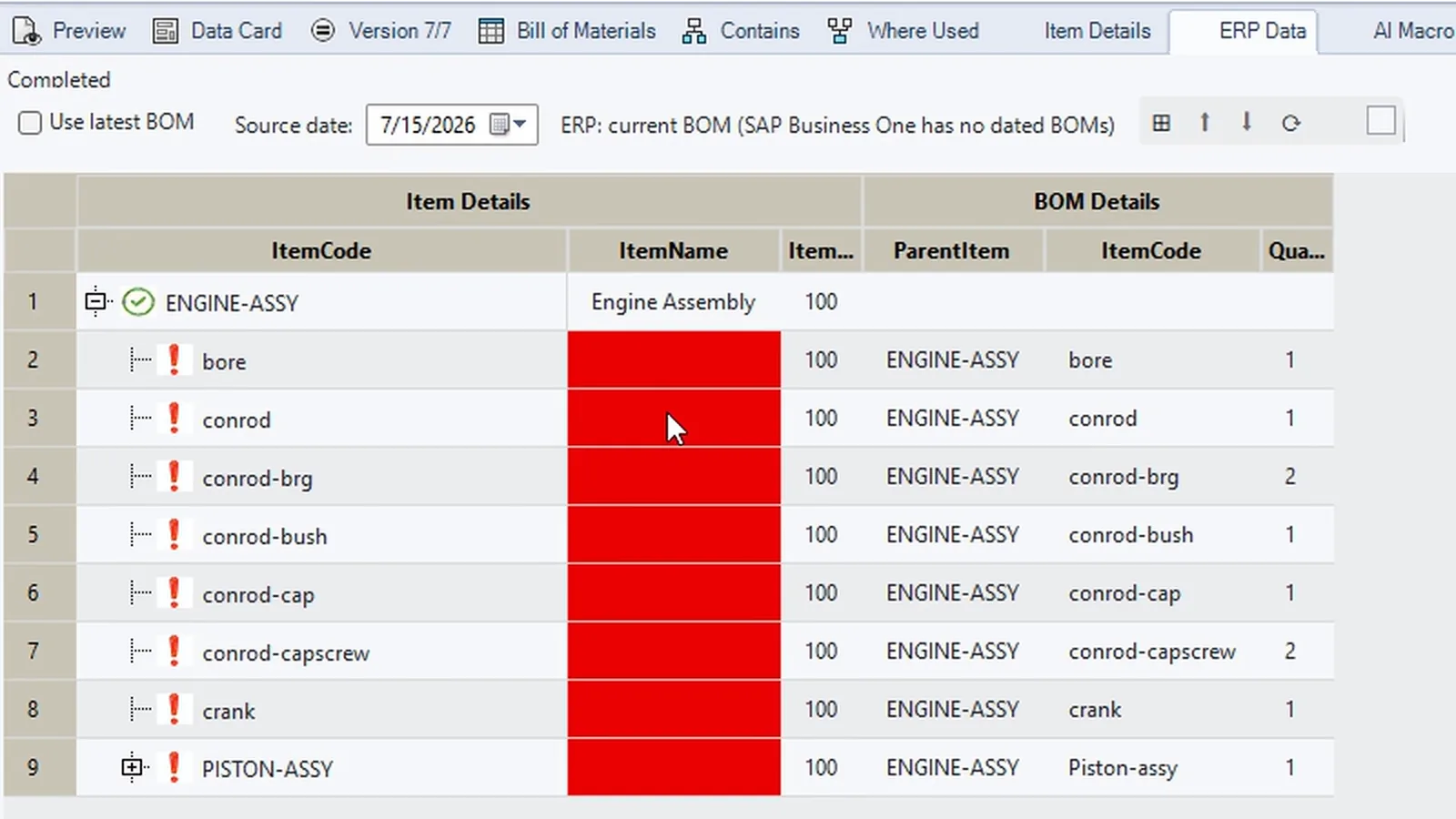
ERP Data tab with Use latest BOM off and source date 15 July 2026: every item name red because the data cards had no descriptions then

As of a date

Compare the bill of materials as of a date

SAP Business One keeps one current bill of materials, so the vault's structure on the date you pick is compared with today's rows in SAP Business One; the tab says so next to the date.

On 15 July the data cards had no descriptions yet, so every name stands out in red. On a recent date the names match again.

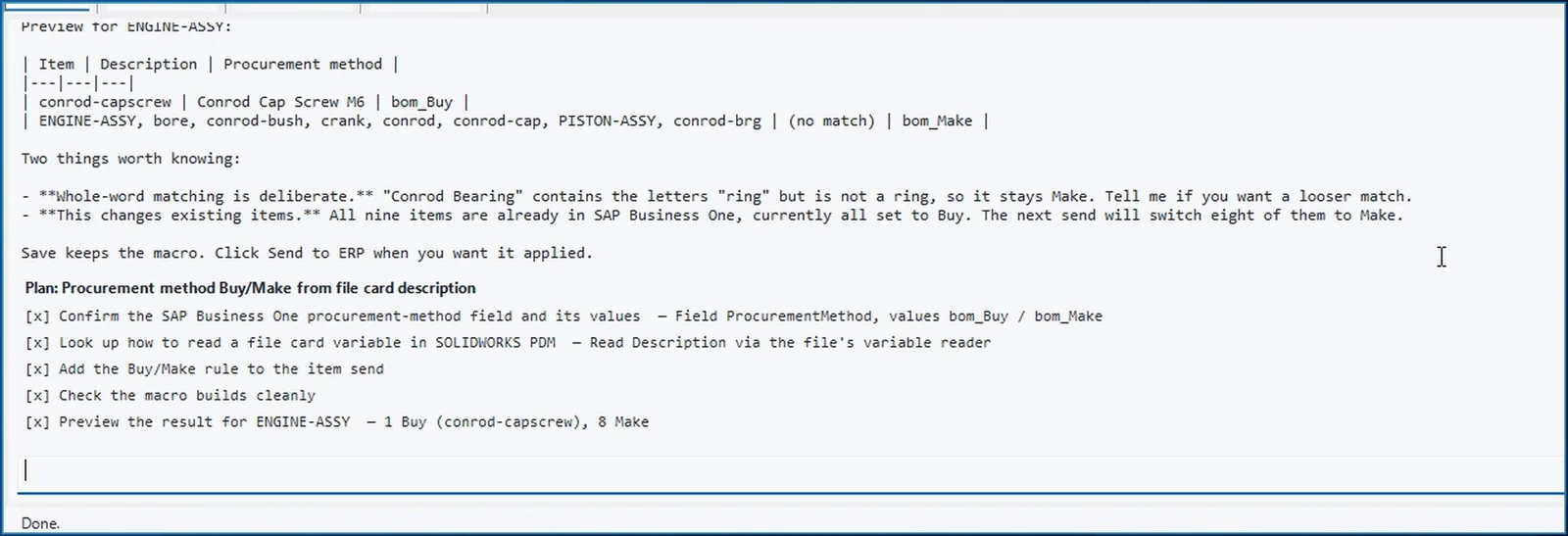
AI Macro Chat in SOLIDWORKS PDM: preview of the Buy/Make rule, the cap screw bom_Buy, the other items bom_Make

Rules and AI

Your company rules in plain words

Describe a rule in plain words: parts with screw, ring or pin in the data card description are bought, everything else is made. The AI looks up the field in SAP Business One and how to read the data card, asks for your approval before it changes the macro, writes the rule, checks that it compiles and previews the result on the real assembly.

  • Preview: the cap screw is set to Buy, everything else to Make.
  • Whole words only: a conrod bearing is not taken for a ring.
  • Nothing has been saved or sent at that point.
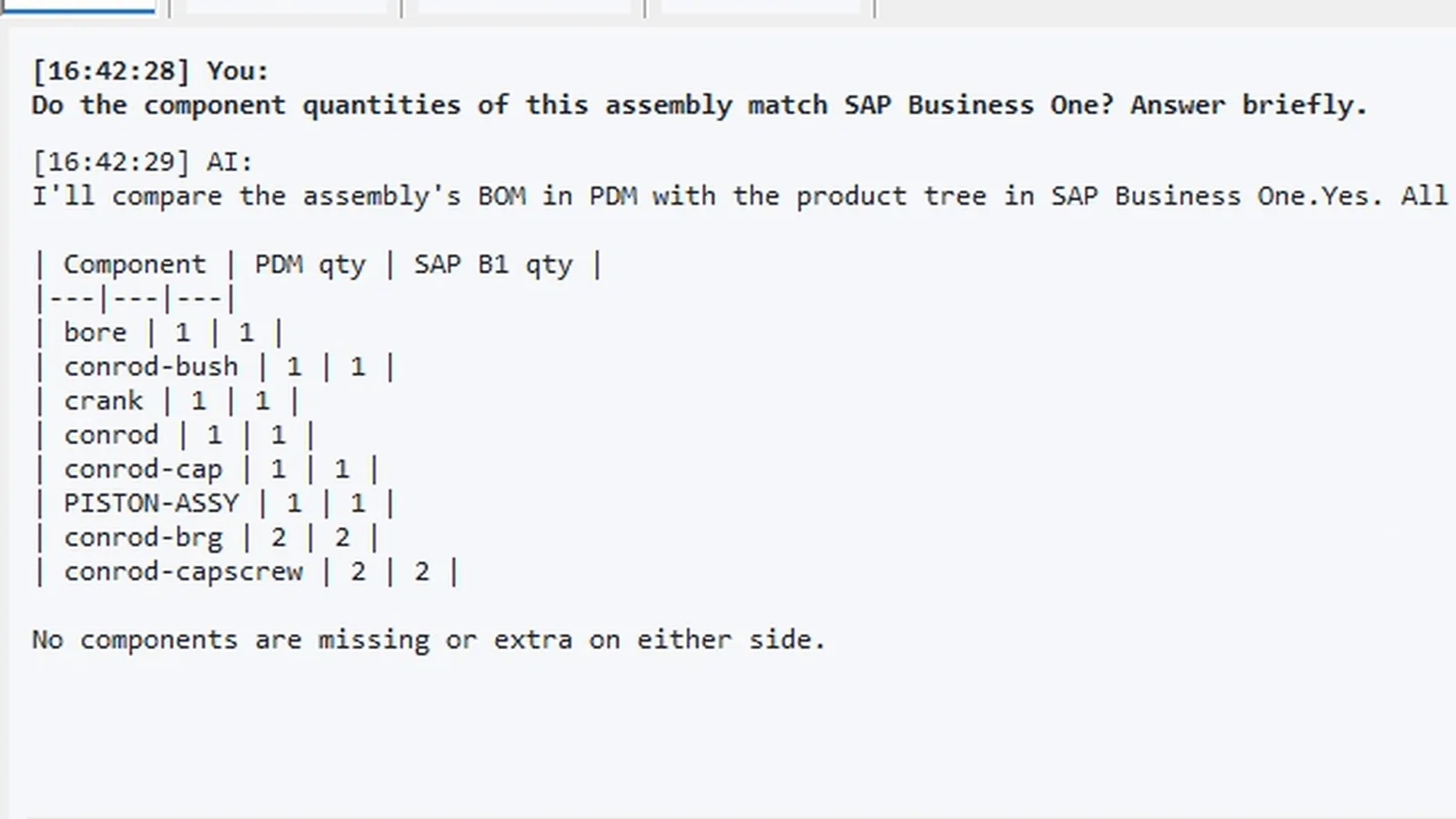
AI chat in SOLIDWORKS PDM comparing the assembly in PDM with the bill of materials in SAP Business One: all eight components match

Questions

Ask about the assembly

Asked whether the component quantities of the assembly match SAP Business One, the assistant reads the bill of materials in the vault and the live rows in SAP Business One and answers: all eight components match, quantity for quantity.

AI chat in SOLIDWORKS PDM: where conrod.sldprt is used in the vault, and that engine_assy2.sldasm exists in SAP Business One as ENGINE-ASSY

Where-used search

Which files use this part, and are they in SAP Business One?

Ask which files in the vault use the connecting rod and which of them exist in SAP Business One: the assistant runs a where-used search in PDM, looks the result up in SAP Business One and answers in one table: the engine assembly, and it is there.

The assistant works with your own key for Claude, OpenAI, Azure OpenAI or a compatible model, with a ChatGPT sign-in, with a coding agent such as Claude or Gemini, or with your own assistant through the MCP connector. Whatever it proposes, nothing is changed until you approve it.

Related integrations

SAP Business One from other applications, SOLIDWORKS PDM with other ERPs

ERP Integrator for desktop applications is installed for one ERP: Business Central, Dynamics 365 Finance and Operations, SAP S/4HANA, SAP Business One or Odoo.

FAQ

Questions about SOLIDWORKS PDM and SAP Business One

What does the integration create in SAP Business One from a PDM assembly?

Send to SAP Business One all levels creates or updates an item for the assembly and every file in its bill of materials, and a bill of materials with its lines for the assembly and each sub-assembly. The values come from the data cards through the field mapping.

Which value becomes the SAP Business One item number?

Whatever the settings say: a part number variable on the data card, or, as in the demo, the file name. The same goes for the description and every other field.

Can I compare a bill of materials as of a date with SAP Business One?

Yes, from the source side. SAP Business One keeps one current bill of materials per item, without versions or validity dates, so the ERP Data tab compares the structure as it was on the date you pick with today's rows in SAP Business One, and says so on screen. ERPs with dated BOMs, such as Business Central, compare both sides on that date.

Which AI models can the assistant use?

Your own key for Claude, OpenAI, Azure OpenAI or a compatible model, a ChatGPT sign-in, a coding agent such as Claude or Gemini, or your own assistant through the MCP connector. The assistant can read both systems, but the field mapping, the macro and the ERP data change only after you approve.

Does the same add-in work with other ERPs and applications?

Yes. ERP Integrator for desktop applications connects SOLIDWORKS PDM to Business Central, Dynamics 365 Finance and Operations, SAP S/4HANA, SAP Business One and Odoo, chosen when you install it, and also runs in SOLIDWORKS, Autodesk Vault, Autodesk Inventor and Excel.

Bring a vault assembly and your SAP Business One item fields

In a demo we send it from your data cards to SAP Business One, check it in the vault and show how your own rules would be written. Questions first? Use the contact page.

Cookies Notice

We use cookies to improve your browsing experience and to understand how our website is used. Cookies help us deliver better performance, personalize content, and analyze traffic. By continuing to use PLM CAD Utilities, you agree to our use of cookies.